Effortless Image Downloading Within Chrome
Image Downloader – Imageye is a Chrome browser extension designed to help users find and download images directly from the web without leaving the browser. It focuses on speed and convenience, allowing users to collect images from a page without relying on manual saving or external tools. The extension works entirely within Chrome and is aimed at people who frequently gather visual content while browsing.
Top Recommended Alternative

Streamlined image extraction for browser users
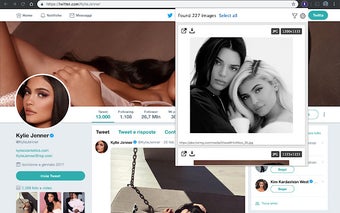
Imageye integrates directly into Chrome and scans the currently open webpage for images. Instead of downloading files blindly, it presents detected images in a visual preview grid, which makes selection easier and more controlled. Users can choose specific images or download multiple files at once, which functions as a clear advantage for anyone working with galleries, articles, or reference material. The extension remains page-based, meaning it only works on content visible to the browser.
Practical controls with clear limitations
Beyond basic downloading, Imageye includes filtering options that help narrow results by file type, size, or resolution. These controls reduce clutter and make bulk downloading more manageable, especially on image-heavy pages. At the same time, the feature set stays intentionally limited. The extension does not crawl multiple pages, automate downloads, or bypass site restrictions, which defines a clear boundary for users expecting advanced scraping behavior.
Focused tool for quick image collection
Image Downloader – Imageye works best as a lightweight utility for quick image collection during everyday browsing. Its simplicity and preview-based selection support fast workflows, while its dependence on page-level access limits effectiveness on dynamically loaded or protected images. For designers, students, and researchers who need a straightforward way to save images from a page, it delivers reliable results without unnecessary complexity.